Firmware Guide
Links to information about each Core/Board
Includes schematics, dimensions, example code, 3D files and more.
RK3568 img: Mega
Cartographer:
https://docs.cartographer3d.com/cartographer-probe/installation-and-setup
Spider Pro:
https://github.com/FYSETC/Spider\_Pro
SB Combo:
https://wiki.fysetc.com/SB_Combo_V2/
https://github.com/FYSETC/SB_Combo_V2
Note:
By default, the three motherboard working modes of Venture XL are as follows
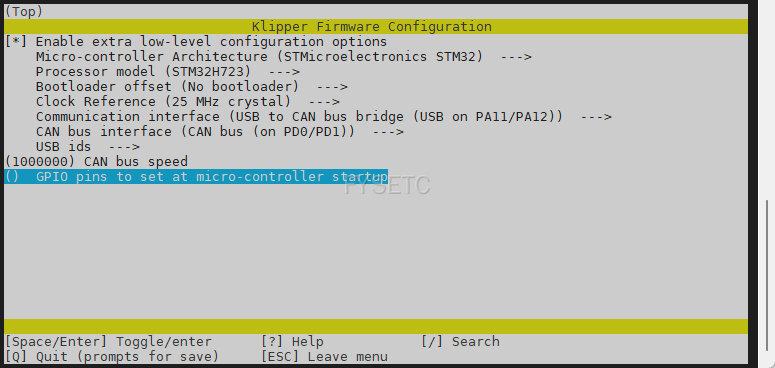
Spider_Pro:
USB to CANBUS Bridge Mode, No bootloader, with 120R resistor (the jumper cap next to MCU_CAN is installed by default)
It provides CAN2, which is used to connect SB_Combo and Cartographer, hardware link reference here:
klipper configuration is as follows:
SB_Combo:
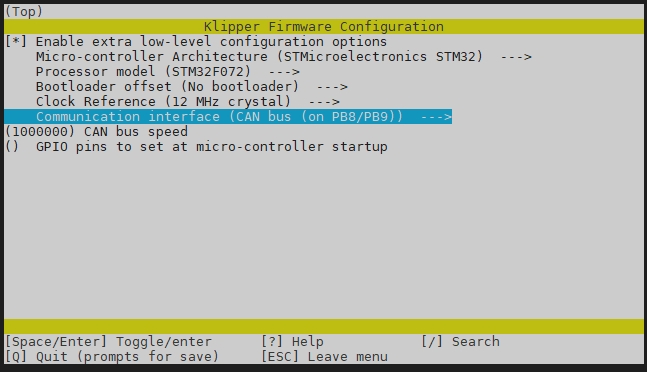
CANBUS, 1000000, No bootloader, with 120R resistor (120R jumper pad is enabled by default)
klipper configuration is as follows:
Cartographer:
CANBUS, 1000000, without 120R resistor
Firmware update guides
Updated on: 03/08/2026
Thank you!