FYSETC Paneldue 5i/7i
Product Introduction
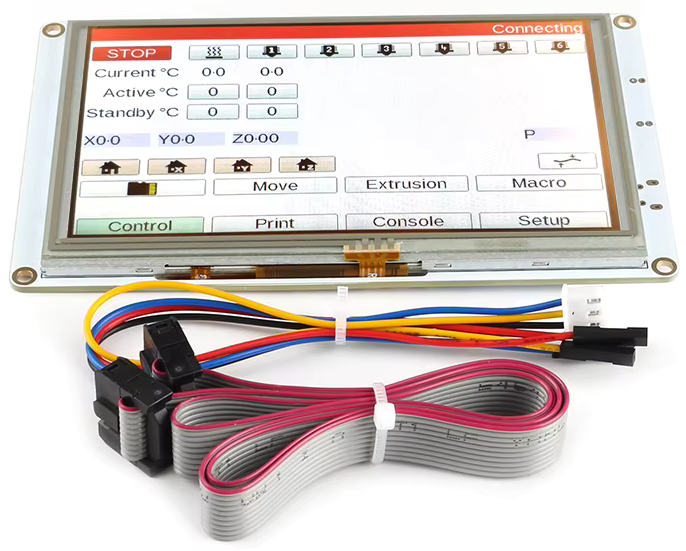
The PanelDue 5i/7i is colour touch screen controller for the Duet and other 3D-printing electronics that support it. This integrated version is a custom-made high-quality 5/7 inch TFT LCD panel from a leading manufacturer.
Features
- Resolution of 800×480 pixels on a 5/7 inch LCD.
- 5V power from host 3D printer controller.
- 2-wire async serial interface with 3.3V signal level (5V tolerant input).
- Connections to the onboard micro SD card socket as well as the PanelDue serial and power connections are all available via a 10-way ribbon cable. A 300mm long ribbon cable (maximum recommended length) is supplied.
- 4-wire cable to connect the PanelDue to your controller board for the serial and power connections. A 300mm long cable is also supplied (maximum recommended length).
Application
RepRap Firmware based 3D printers or other CNC machines.
Wiring
4 Way Cable
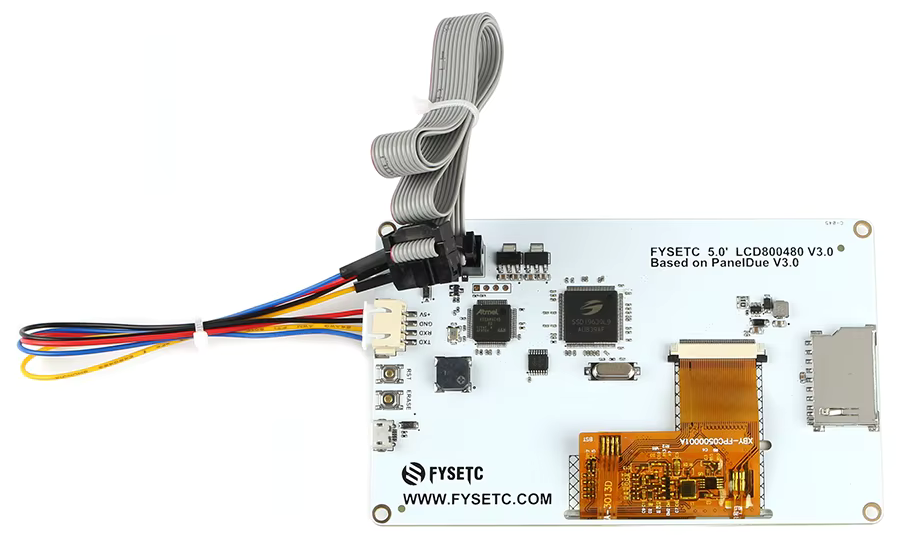
A Fysetc PanelDue can be connected to connector IO_0 using a 4-core cable wired like the one shown in the images below. The 4-wire cable supplied with the Fysetc PanelDue has a 4-way JST XH on one end and 4 individual Dupont connectors on the other.
The 4-wire cable does not allow access to the SD card socket on the PanelDue.
Ribbon Cable
Connect a 10-way ribbon cable between the socket on the Fysetc PanelDue and compatable socket on the mainboard in use, such as the Fysetc Big Dipper. It supports use of the SD card slot while using this connection type.
The connector is a standard 10 pin 2 row 2.54mm pitch box connector that accepts IDC connectors for 1.27mm ribbon cable.
Screen Mounts
A number of screen mounts can be found on Printables.
Firmware
Please see the Duet documentation for details of installing and updating the firmware for the display, Installing and Updating PanelDue Firmware.
Configuration
Using the following gcode within the config.g
Firmware version 3.6.X and belowM575 P1 S1 B57600 ; Setup Paneldue
Firmware version 3.7.X and upM575 P2 S1 B57600 ; Setup Paneldue
Documents
Where To Buy
Fysetc Official AliExpress Store
Technical Support Channels
Updated on: 07/09/2026
Thank you!